First, install the repository, GPG key, and install the Google Cloud SDK
# Add the Cloud SDK distribution URI as a package source
echo "deb http://packages.cloud.google.com/apt cloud-sdk main" | sudo tee -a /etc/apt/sources.list.d/google-cloud-sdk.list

# Import the Google Cloud Platform public key
curl https://packages.cloud.google.com/apt/doc/apt-key.gpg | sudo apt-key add -

# Update the package list and install the Cloud SDK
sudo apt-get update && sudo apt-get install google-cloud-sdk
Init the GCP SDK
On desktop workstations, you can use the regular gcloud init. However, on console-only systems, you will need to use the following command:
gcloud init --console-onlyYou will be asked to authenticate, then you will have to copy/paste an URL in your browser (Even if your are working remotely on another server):

Then, pick the project you want to work with, and set if ask, the default region (europe-west6-a for Zurich for instance).
Configure Terraform
Go to a clean folder on your Linux server, then edit a main.tf file with the following:
provider "google" {
  credentials = file("account.json")
  project     = "my-project-id"
  region      = "us-central1"
}

resource "google_compute_project_default_network_tier" "default" {
  network_tier = "PREMIUM"
}
Note that we set the tier to STANDARD, you can use PREMIUM depending on your needs.
Then, create the account.json and paste the content of the key file you have created.
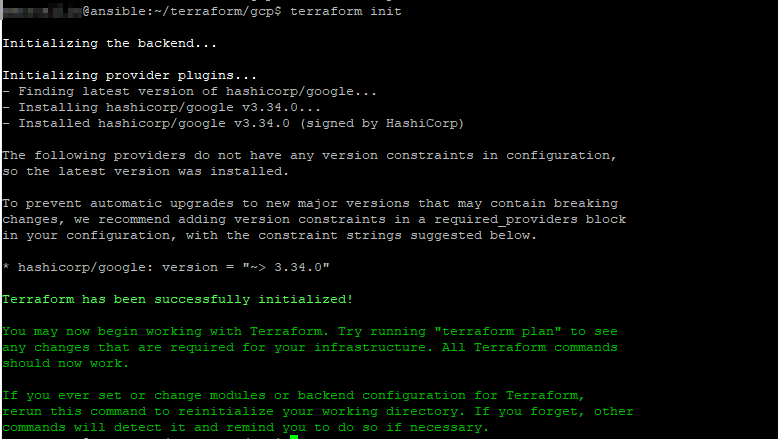
Eventually, run the following command to initialize your project:
terraform initAnd you should end with a similar screen:
Example: create a vm instance in your project
Within your Terraform project folder, create beside the main.tf, a new file called whatever you want, but related to the instance you want to create, with the following content:
resource "google_compute_instance" "vm_instance" {
  name         = "my-instance-01"
  machine_type = "f1-micro"
  zone         = "europe-west6-a"

  boot_disk {
    initialize_params {
      image = "ubuntu-2004-focal-v20200720"
    }
  }

  network_interface {
    # A default network is created for all GCP projects
    network = "default"
    access_config {
    }
  }
}
This file defines a f1-micro instance located in europe-west6-a, running on ubuntu 20.04, with a default network configuration.
To check what is going to be created, run the command below:
terraform planTo actually apply this plan, run the following command:
terraform apply