Often, you will have to deal with strings in your scripts. For instance, parsing Syslog files to find out and graph very specific information. And when it comes to string manipulation, the cut command can be very useful!
Cutting by byte position
This mode will allow you to cut from a position to another, let say between the first and the fourth-byte position. If your string includes a special char that uses more a byte, cutting with this mode can be tricky. As a result, I don’t use that mode, yet it’s good to know for very specific usage:
# This will return M
echo 'My first string' | cut -b 1

# This will return Mf
echo 'My first string' | cut -b 1,4

# This will return My first
echo 'My first string' | cut -b 1-8
Cutting by character
This is the one I use the most, that is the same command but it doesn’t take into account the size of each character, only their position, so no bad surprise:
# This will return M
echo 'My first string' | cut -c 1

# This will return Mf
echo 'My first string' | cut -c 1,4

# This will return My first
echo 'My first string' | cut -c 1-8
Cutting by delimiter
Here comes the real power of cut, using a delimiter made from a single character will allow you to do great things. In addition to that delimiter, you need to provide the field number, see the following to better understand.
Let’s take a more complex example to show you what is possible. Imagine you want to list all the bash used by the users on your system. This information can be found on /etc/password.
First, let see what looks like an entry located in /etc/passwd :
smar:*:101:1:Seb Mar:/home/smar:/usr/bin/zshWe have 7 fields, the one we want is the last one. All those fields are separated by a semicolon. So, it’s pretty simple “:” will be our delimiter and we will ask for the 7th field:
# This will show you the list of all the shell defined in /etc/passwd
# With redundancy though
cat /etc/passwd | cut -d ':' -f 7
To finish properly our little exercise, let’s filter that to avoid duplicate using sort:
# This will show you the list of all the shell defined in /etc/passwd
# Without duplicates!
cat /etc/passwd | cut -d ':' -f 7 | sort -u
Please note that extracting more than a single field will return the selected fields separated by the same delimiter. For instance:
# The command below will return smar:/usr/bin/zsh
cat "smar:*:101:1:Seb Mar:/home/smar:/usr/bin/zsh" | cut -d ':' -f 1,7
However, if you want to replace this delimiter, you can use the –output-delimiter directive:
# The command below will return smar,/usr/bin/zsh
cat "smar:*:101:1:Seb Mar:/home/smar:/usr/bin/zsh" | cut -d ':' -f 1,7 --output-delimiter=','
Using complement to reverse the result
If you need the opposite result of your filter, cut provide the –complement directive to achieve that:
# While this will return My first
echo 'My first string' | cut -c 1-8

# This will return string
echo 'My first string' | cut -c 1-8 --complement
I hope those tips will help you scripting more efficiently!


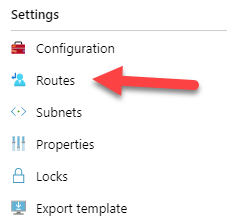
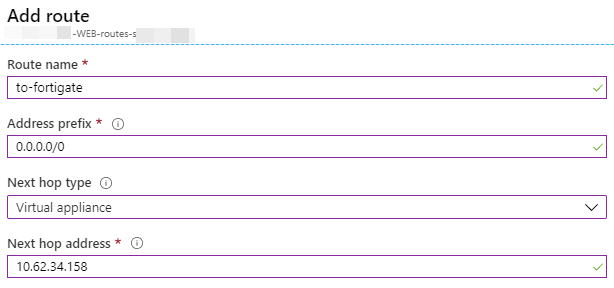
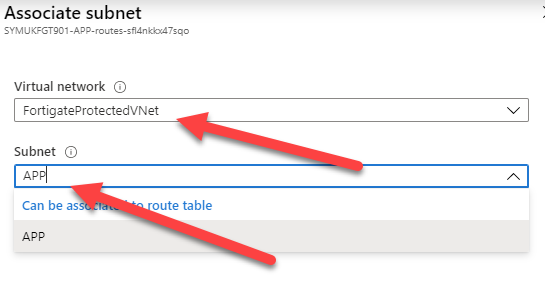
 Before moving further, at this time, there is no way to configure your Azure network to push another gateway that the Azure default to your machine, you can create route for the next-hop, but those routes can’t override the default gateway. Long story short, you will have to manually configure the default gateway of your servers to make them use your Fortigate as their next-hop.