Tag Archives: network

OPNSense Insight

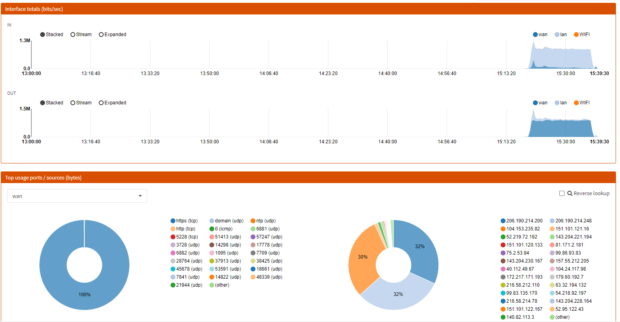
OPNSense: Fix Insight feature issue when getting “No data available”

Not so long ago, I switched my firewall/routing/all-in-home network solution from PfSense to OPNSense. While it was working quiet well for months, I have noticed that the Insight feature was showing me a “No data available”. I’ll explain how I worked around it, maybe some other solutions exist though.

Why this happened?

After some investigation, I found that issue was caused by the latest upgrades I applied. I must admit this is a bit disappointing since I don’t update OPNSense configuration very often, actually, it was working for 3 months without any modification… Anyway, let’s say this is not important enough to be a real bumper, but I’m still thinking that maybe other features were broken and I just didn’t discover them yet…

What is broken exactly?

It seems the issue is related to a Sqlite database corruption, first I checked the flowd service using that command under an elevated shell:

service flowd_aggregate status

And the service was not running, so I checked the log under System>Log files>General to see that I had a lot of lines involving an issue with flowd_aggregate service.

Eventually, going under Reporting>Settings then hit Reset Netflow Data did the job. Don’t forget to restart the flowd_aggregate service too. Doing that, you will lose former data, and just so you know, I tried the Repair Netflow Data with no joy.

Dealing with cipher suites

A part of my daily job is to improve application security, at large. Doing so, I often have to deal with cipher suites hardening.

This task is not complex at all, yet you have to manage different libraries that are using different naming conventions (RFC, GnuTLS, OpenSSL, etc.). You can always count on the documentation or your favorite search engine, nonetheless, depending on their quality, that will make you waste a lot of time.

Fortunately, I found a very handy website, created by Hans Christian Rudolph and Nils Grundmann, which gives you much information about those libraries, cipher suites, protocols, etc. It also offers an API, yet that still a work in progress. Long story short, anytime you need to deal with cipher suite, you should take a look at it:

https://ciphersuite.info/

Windows Server: set up a network adapter using PowerShell

You will find simple commands to set up your network adapter settings using PowerShell.

Get the nework cards list:

Get-NetAdapter

Once you know which card you want to setup, we can store store it in a variable:

$netadapter = Get-NetAdapter -Name Ethernet

Then, you can run different commands to setup specific settings:

DHCP

$netadapter | Set-NetIPInterface -Dhcp Disabled

Configure IP address and Gateway

$netadapter | New-NetIPAddress -IPAddress 10.0.0.251 -PrefixLength 24 –DefaultGateway 10.0.0.254

DNS servers and search suffix

$netadapter | Set-DnsClientServerAddress -ServerAddresses ("10.0.0.1","10.0.0.2")
$netadapter | Set-DnsClient -ConnectionSpecificSuffix "fevio.fr"